Kotlin + Android + Junit5 + Jacoco + Gradle 5.4.1
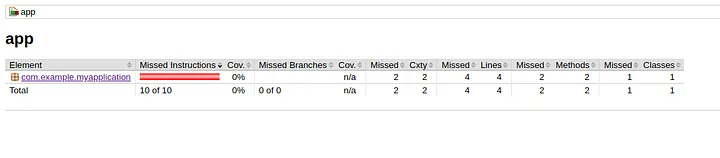
Typical Jacoco report for a hello-kotlin-android app.
I was having a bit of trouble getting this combination of tools working, and found most of the information available to be missing or incomplete, but managed to cobble together something that works, so hopefully this helps someone else (or me later when I try it again):
In this guide, I found using the jacoco-android plugin a helpful way to avoid having to add a whole bunch of groovy to get Jacoco to find the Kotlin classes. Unfortunately, the recommended version of the plugin (0.1.2) came up with a missing property error. The solution is to bump the version to at least 0.1.4.
This goes in the project build.gradle:
buildscript {
  repositories {
    ...
    jcenter()
  }
  dependencies {
    ...
    classpath 'com.dicedmelon.gradle:jacoco-android:0.1.4'
  }
}
Then in the app build.gradle the jacoco-android plugin should be applied. I added this right after the kotlin-android plugin is applied.
apply plugin: 'jacoco-android'
This still will not cause the reports to be generated correctly, however, so I found from a non-android kotlin tutorial that adding the following to the android configuration block in the app will work:
testOptions {
    unitTests.all {
        useJUnitPlatform()
        jacoco {
            append = false
            destinationFile = file("$buildDir/jacoco/moduleTestsCoverage.exec")
            includeNoLocationClasses = true
            excludes = ['jdk.internal.*']
        }
    }
}
After this you should see the reports showing up in app/build/reports/jacoco.
If you want to start from a working repository, you can check out a demo project I created on Github.